REST API
Workspace tokens and scopes, every /api/v1 endpoint, the feature-query grammar, metrics, publishing, pagination, the agent budget and error codes.
Base URL: https://spatly.io/api/v1. On a self-hosted deployment it is <your origin>/api/v1. JSON in, JSON out. The same operations are available to agents as MCP tools.
Authentication
| How | Header or parameter | Who uses it |
|---|---|---|
| Workspace token | Authorization: Bearer spk_<prefix>_<secret> | scripts, agents, the MCP bridge |
| Session cookie | a signed-in member's browser | the Studio itself |
| Public id | ?pub=<publicId> on data and metric endpoints | published viewers and embeds, read-only, project-scoped |
Create a token under Settings → API tokens. The secret is shown once. Scopes:
| Scope | Grants |
|---|---|
read | every GET, plus the feature-query endpoints |
write | create projects, beats, chapters, insights, datasets, uploads |
publish | POST /surfaces/:id/publish |
A token missing the needed scope gets 403 forbidden. With no credentials at all:
{ "error": { "code": "unauthorized", "message": "Provide a session or Bearer spk_ token" } }
TOKEN=spk_…
BASE=https://spatly.io/api/v1
curl -H "Authorization: Bearer $TOKEN" $BASE/me
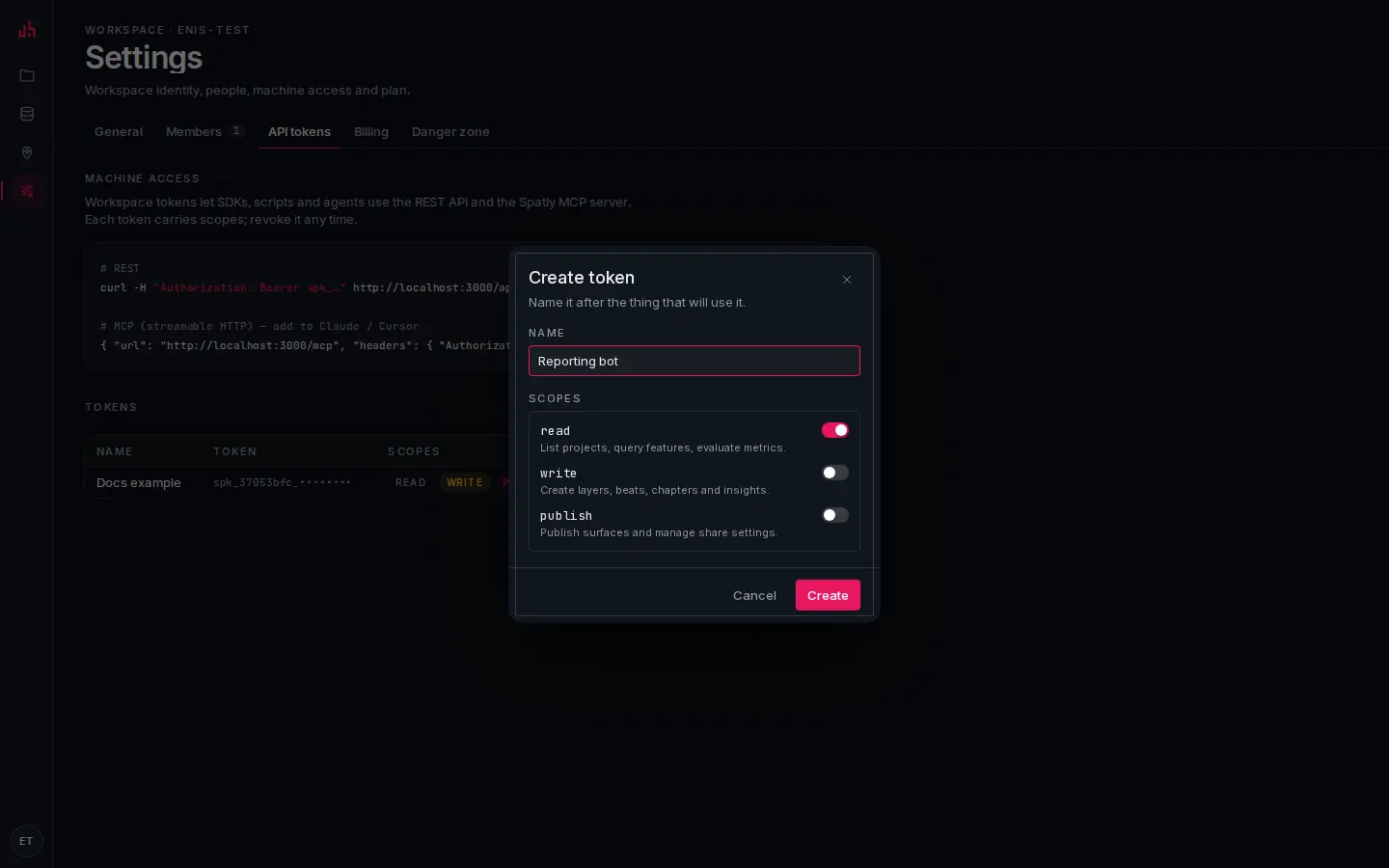
- Name: name it after the thing that will use it, not after yourself. It is what you will look for when you revoke it.
- read: list projects, query features, evaluate metrics.
- write: create layers, beats, chapters and insights.
- publish: publish surfaces and change share settings.
- Create: the secret is shown once, on the next screen. Copy it then.
- Ready-made snippets: the REST call and the MCP client entry for this deployment.
- Tokens: prefix, scopes, last use. Revoking takes effect on the next request.
Errors
Every error has the same shape:
{ "error": { "code": "not_found", "message": "Project not found" } }
| Code | Status | When |
|---|---|---|
bad_request | 400 | the message lists the validation issues |
unauthorized | 401 | no session and no valid token |
forbidden | 403 | the token lacks the scope, or the resource is another workspace's |
not_found | 404 | |
not_ready | 409 | the dataset is still ingesting |
too_large | 413 | upload over the size limit |
rate_limited | 429 | over the agent budget; carries Retry-After |
upstream | 502 | a live source failed |
internal | 500 |
Pagination
List endpoints take ?limit= (≤ 500, clamped further by the budget) and ?cursor=, and answer:
{ "items": [ … ], "nextCursor": "bzoz" }
The cursor is opaque; pass it back verbatim. When nextCursor is null you have everything.
Endpoints
Workspace
| Method | Path | Scope | Returns |
|---|---|---|---|
| GET | /me | read | workspace, plan, principal (via, scopes) and the agent budget |
Projects
| Method | Path | Scope | Returns |
|---|---|---|---|
| GET | /projects?limit&cursor | read | { items, nextCursor }; templates are flagged isTemplate |
| POST | /projects | write | { name, description?, basemapId? } → project (201) |
| GET | /projects/:id | read | { project, layers, beats, surfaces (with share url), datasets, metrics, annotations } |
| PATCH | /projects/:id | write | { name?, slug?, description?, basemapId?, defaultSurfaceId? } → project. POST is an alias |
| DELETE | /projects/:id | write | { ok: true, id }; cascades to layers, beats, surfaces, metrics and publish configs — datasets survive |
| POST | /projects/:id/datasets | write | { datasetIds } → project; attach datasets that have no layer of their own |
| GET | /projects/:id/layers | read | { items: [layerSummary] } |
| POST | /projects/:id/layers | write | { datasetId, name?, renderType?, style?, interactive?, legend?, slot?, zIndex?, timeField?, baseFilter? } → layer (201) |
| GET | /projects/:id/surfaces | read | { items: [{ id, kind, name, publish, url }] } |
| POST | /projects/:id/surfaces | write | { kind, name? } → surface with its starter body (201) |
| GET | /projects/:id/beats | read | { items: [beat] } |
| POST | /projects/:id/beats | write | { name?, camera? | bbox?, layerStates?, highlights?, time? } → beat (201) |
| GET | /projects/:id/kpis?bbox&where&from&to&aoi | read | { items: [{ …metric, value }] } |
| GET | /projects/:id/metrics | read | { items: [metric] } — definitions only, no evaluation |
| POST | /projects/:id/metrics | write | { name, datasetId? | connectionId?, aggregation?, field?, groupBy?, filter?, spatialScope?, timeseries?, valuePath?, format? } → metric (201) |
| POST | /projects/:id/insights | write | { name, text?, metricIds?(≤4), beatId? | camera? | bbox?, cta?, expandMode?, variant? } → { surfaceId, beatId, studioUrl } |
Layers and datasets
| Method | Path | Scope | Returns |
|---|---|---|---|
| GET | /layers/:id | read | describe: layer, project, dataset with fields and stats, style, classification, legend, time field |
| PATCH | /layers/:id | write | { name?, renderType?, style?, interactive?, legend?, slot?, zIndex?, defaultVisible?, dataMode?, timeField?, baseFilter?, minzoom?, maxzoom? }. style and interactive merge into the existing ones. POST is an alias |
| GET | /datasets?limit&cursor | read | { items, nextCursor } |
| GET | /datasets/:id | read · pub | fields (name, type, role, stats), bbox, time field, refresh policy, urls |
| PATCH | /datasets/:id | write | { name?, description?, timeField?, refreshPolicy? } → dataset summary, plus notice when the refresh was raised to the plan floor. POST is an alias |
| GET | /datasets/:id/geojson?bbox&limit&fields | read · pub | FeatureCollection, ETag / 304 |
| GET | /tiles/:datasetId/:z/:x/:y | read · pub | Mapbox Vector Tile (ST_AsMVT) |
| POST | /datasets/from-url | write | { url, name?, refreshSec?, headers?, format?, recordsPath?, lngField?, latField?, idField? } |
| POST | /upload | write | multipart file, GeoJSON, CSV, KML, GPX, zipped Shapefile, PMTiles, up to the plan’s per-file cap (10 MB Free, 50 MB Pro/Team); over it returns 413 too_large |
Features
| Method | Path | Scope | Body |
|---|---|---|---|
| POST | /features/query | read · pub | { datasetId, bbox?, where?, select?, limit?, offset?, orderBy?, order?, geometry?, within?, near?, q? } |
| POST | /features/search | read | { datasetId, q, limit?, select?, geometry? }, case-insensitive over label fields |
| POST | /features/spatial | read | { datasetId, polygon? | near { lng, lat, radiusM } | bbox?, where?, limit?, select? } |
Every response is a FeatureCollection plus total, limit, offset, nextCursor and the budget that was applied. Each feature carries properties.__fid, the stable id you use in selection.
curl -H "Authorization: Bearer $TOKEN" -H 'content-type: application/json' \
  -X POST $BASE/features/query -d '{
    "datasetId": "DATASET_ID",
    "where": { "mag": { "gte": 7 } },
    "orderBy": "mag", "order": "desc",
    "select": ["place", "mag", "time_iso"],
    "geometry": false,
    "limit": 5
  }'
{ "type": "FeatureCollection",
  "features": [ { "type": "Feature", "id": "us6000m0xl", "geometry": null,
                  "properties": { "mag": 7.5, "place": "2024 Noto Peninsula, Japan Earthquake", "__fid": "us6000m0xl" } } ],
  "total": 4, "limit": 5, "offset": 0, "nextCursor": null,
  "budget": { "maxLimit": 500, "requireBbox": false } }
The where grammar
where is a JSON object, not a MapLibre expression. Expressions are for styling; queries are compiled to bound SQL parameters.
| Form | Meaning |
|---|---|
{ "field": value } | equality |
{ "field": [a, b] } | IN (a, b) |
{ "field": { "gte": 5 } } | operators: eq ne gt gte lt lte in not-in like isNull |
Numbers compare numerically, strings textually. A like pattern with no % is treated as contains. Field names must match [\w .\-:/]{1,120}; every value is bound, never interpolated.
warningpassing a MapLibre expression here returns 400 bad_request: where: Invalid input: expected record, received array. Layer and beat filters use expressions; the feature API uses the object grammar.
Metrics
| Method | Path | Scope | Returns |
|---|---|---|---|
| GET | /metrics/:id | read | the metric definition |
| GET | /metrics/:id/value?bbox&where&selection&from&to&aoi | read · pub | a MetricValue |
| GET | /metrics/:id/timeseries?bucket&from&to&bbox&where | read · pub | MetricValue plus series, bucket, timeField |
| GET | /api/live/metrics/:id?…&pub= | read · pub | the same value; this is what dashboards poll |
{ "metricId": "…", "value": 344, "previous": 301,
  "series": [{ "t": "2024-01", "v": 28 }], "breakdown": [{ "key": "mww", "v": 55 }],
  "asOf": "2026-09-02T15:56:14.228Z", "status": "ok" }
status is ok, stale or error. The ETag is a hash of the value: send If-None-Match and get 304 when nothing moved. Parameters: bbox=w,s,e,n · where=<json> · selection=fid1,fid2 · from/to ISO (with both, previous is the same window shifted back) · aoi=<GeoJSON polygon> · bucket=hour|day|week|month|year.
Geocoding
| Method | Path | Returns |
|---|---|---|
| GET | /geocode?q=&limit=&countryCodes= | { items: [{ name, lng, lat, bbox, type, source }] } |
| GET | /reverse?lng=&lat=&zoom= | { result: GeocodeResult | null } |
A Nominatim proxy: 1 request per second, cached seven days. Attribution (© OpenStreetMap contributors) is required wherever results are shown.
Surfaces
| Method | Path | Scope | Body → Returns |
|---|---|---|---|
| GET | /surfaces/:id | read | the surface with its body tree and publish state |
| PATCH | /surfaces/:id | write | { name?, slug?, body?, actions?, settings?, layerPolicy? } → surface. body replaces the whole block tree. POST is an alias |
| POST | /surfaces/:id/chapters | write | { title, text?, blocks?, camera? | bbox?, layerStates?, highlight?, beatId?, index?, transition?, layout? } → { chapterId, beatId, index, studioUrl } |
| POST | /surfaces/:id/publish | publish | { visibility?, showSpatlyBadge?, allowEmbed?, seo? } → { publicId, url, embedUrl, visibility } |
| GET | /published/:publicId | public | the viewer payload (the published snapshot) |
| POST | /published/:publicId/events | public | viewer analytics batch |
Live data in
| Method | Path | Auth | Purpose |
|---|---|---|---|
| POST | /api/webhooks/data/:connectionId?secret=&mode=replace|append | the connection secret (?secret=, X-Spatly-Secret or Bearer) | push GeoJSON or records → { received, featureCount, mode } |
| GET | /api/internal/cron?key=<CRON_KEY>[&dry=1] | CRON_KEY | run one scheduler tick from an external cron |
Building a whole project from a script
The endpoints above cover the loop a Studio user walks: dataset → layer → metric → surface body → publish. Nothing in it needs database access; a workspace token with write and publish is enough.
TOKEN=spk_…
BASE=https://spatly.io/api/v1
H=(-H "Authorization: Bearer $TOKEN" -H 'content-type: application/json')

# 1. a project, with the slug you will look it up by on the next run
PID=$(curl -s "${H[@]}" -X POST $BASE/projects -d '{"name":"Wildfire watch","basemapId":"noir"}' | jq -r .id)
curl -s "${H[@]}" -X PATCH $BASE/projects/$PID -d '{"slug":"wildfire-watch"}'

# 2. a live dataset, then its time column
DS=$(curl -s "${H[@]}" -X POST $BASE/datasets/from-url \
      -d '{"url":"https://example.com/feed.geojson","name":"Events","refreshSec":60}' | jq -r .dataset.id)
curl -s "${H[@]}" -X PATCH $BASE/datasets/$DS -d '{"timeField":"ignition_time_est"}'

# 3. a styled layer (this also attaches the dataset to the project)
LID=$(curl -s "${H[@]}" -X POST $BASE/projects/$PID/layers -d '{
  "datasetId":"'$DS'", "name":"Events", "renderType":"symbol",
  "style":{"markId":"incident","classification":{"field":"tier","method":"categorical","stops":["aday","onayli","teyitli"],"ramp":["#8A93A0","#F5A524","#EB3434"]}},
  "interactive":{"click":true,"titleField":"#{{event_id}} · {{tier}}","tooltipFields":["tier","status","frp_max"],
                 "media":{"videoField":"video_url","posterField":"poster_url","expiresField":"expires_at"}},
  "legend":{"show":true,"title":"Tier"} }' | jq -r .id)

# 4. a KPI
MID=$(curl -s "${H[@]}" -X POST $BASE/projects/$PID/metrics \
      -d '{"name":"Open events","datasetId":"'$DS'","aggregation":"count","filter":["==",["get","status"],"open"],"spatialScope":"viewport"}' | jq -r .id)

# 5. a dashboard surface, then its body
SID=$(curl -s "${H[@]}" -X POST $BASE/projects/$PID/surfaces -d '{"kind":"dashboard","name":"Wildfire watch"}' | jq -r .id)
curl -s "${H[@]}" -X PATCH $BASE/surfaces/$SID -d '{
  "settings":{"variant":"ops"},
  "body":{"id":"root","type":"dashboard","props":{"variant":"ops","refreshSec":60,"cols":24,"showAsOf":true},
    "children":[
      {"id":"w1","type":"mapWidget","props":{"title":"Map"},"layout":{"grid":{"desktop":{"x":0,"y":0,"w":18,"h":14}}}},
      {"id":"w2","type":"kpiWidget","props":{"title":"Open events","metricId":"'$MID'"},"layout":{"grid":{"desktop":{"x":18,"y":0,"w":6,"h":4}}}}
    ]}}'

# 6. publish
curl -s "${H[@]}" -X POST $BASE/surfaces/$SID/publish -d '{"visibility":"public","allowEmbed":true}'
Three things that are easy to get wrong:
- A dataset with no layer is not attached to the project. A dataset that only backs a metric or a widget's
props.datasetIdmust be attached withPOST /projects/:id/datasets, or the published viewer's?pub=read of it is refused with403 forbidden. PATCH /surfaces/:idreplaces the body wholesale, andactionslikewise. Leaveactionsout (or send[]) to keep the runtime's default wiring — map/table/clip select → filter + fly + flash, map extent → recompute KPIs, date range → time window. Sending your own list replaces all of it.- The refresh interval is raised to the plan floor, and the response carries a
noticesaying so. Free 30 min · Pro 5 min · Team 60 s · Enterprise 15 s.
notethe write endpoints in this section are REST-only for now — the MCP tool list still exposes the read half plus beats, chapters, insights and publishing.
Rate limits and the agent budget
Every workspace carries an agent budget: maxCallsPerMin (60), maxRowsPerCall (500), requireBbox (off). Over the per-minute budget a token gets 429 rate_limited with Retry-After. Feature queries are clamped to maxRowsPerCall, and to the connection's own queryPolicy.maxLimit when the dataset is live. Public-id reads are limited to 600 per minute per public id. See Plans, limits & alerts.
CORS
/api/v1/* answers OPTIONS with 204 and Access-Control-Allow-Origin: *, Access-Control-Allow-Methods: GET,POST,OPTIONS, so a browser client holding a token can call it directly. Responses are Cache-Control: no-store except the ETag-cached data endpoints.
warninga workspace token is a workspace-wide credential. Never put one in a public page. Readers should get the embed runtime or a ?pub=<publicId> read, both of which are scoped to one published surface.
A full session
TOKEN=spk_…
BASE=https://spatly.io/api/v1

curl -H "Authorization: Bearer $TOKEN" $BASE/me
curl -H "Authorization: Bearer $TOKEN" "$BASE/projects?limit=10"
curl -H "Authorization: Bearer $TOKEN" $BASE/projects/PROJECT_ID

# geocode → save a beat → add a chapter → publish
curl -H "Authorization: Bearer $TOKEN" "$BASE/geocode?q=Antakya&limit=1"

curl -H "Authorization: Bearer $TOKEN" -H 'content-type: application/json' \
  -X POST $BASE/projects/PROJECT_ID/beats -d '{
    "name": "Antakya",
    "bbox": [36.05, 36.1, 36.3, 36.3],
    "layerStates": { "LAYER_ID": { "visible": true, "filter": [">=", ["get", "mag"], 4] } }
  }'

curl -H "Authorization: Bearer $TOKEN" -H 'content-type: application/json' \
  -X POST $BASE/surfaces/STORY_ID/chapters -d '{
    "title": "Antakya, 6 February",
    "text": "At 04:17 local time…\n\n> A quote from the field.",
    "bbox": [36.05, 36.1, 36.3, 36.3],
    "highlight": { "layerId": "LAYER_ID", "filter": [">=", ["get", "mag"], 7], "pulse": true }
  }'

curl -H "Authorization: Bearer $TOKEN" -H 'content-type: application/json' \
  -X POST $BASE/surfaces/STORY_ID/publish -d '{"visibility":"unlisted"}'

# poll a KPI with an ETag
curl -i -H "Authorization: Bearer $TOKEN" -H 'If-None-Match: W/"ba2f293c2bcc"' \
  https://spatly.io/api/live/metrics/METRIC_ID
Note the two grammars in that session: layerStates[].filter and highlight.filter are MapLibre expressions (they end up on the map); where on a feature query is the object grammar (it ends up in SQL).
Data model cheat-sheet
- Project → layers (a dataset rendered one way), beats (saved map state), surfaces (story · slides · dashboard · insight), metrics.
- Dataset → features in PostGIS;
fields[]carrytype,role(id/label/category/measure/time/lng/lat) andstats. A live dataset has aconnection(url · rest · arcgis_feature · webhook · mcp) and arefreshPolicy. - Metric → an
aggregation(count/sum/avg/min/max/median/distinct/latest) over afield, with optionalgroupBy,filter(expression),spatialScope(all/viewport/selection/aoi) andtimeseries. - Coordinates are WGS84
[lng, lat]; a bbox is[west, south, east, north].
Verified on 2026-09-02 against the local development build: /me, /projects, /projects/:id, /datasets, /datasets/:id, /datasets/:id/geojson, /features/query, /features/search, /features/spatial, /geocode, /reverse, /projects/:id/kpis, the 401/404 shapes and the CORS preflight were each called with a real workspace token.
Something wrong or missing? Write to hello@spatly.io.