Embedding
The script loader and the plain iframe, every attribute, the postMessage contract in both directions, the window.Spatly helpers and domain restriction.
A live one, first
The block below is a real published Insight Container running in an iframe on this page, mounted when it scrolled into view. Press Open insights. The card posts spatly:expand, and the loader grows the frame.
Where the snippet comes from
Every published surface hands you both forms on its share page.
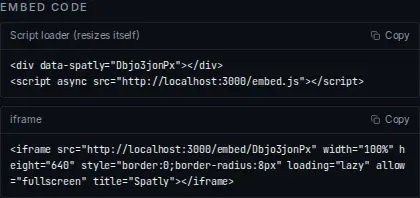
- Script loader: a
divplus an async script. This is the form that resizes itself. - Copy: puts it on the clipboard with your public id already filled in.
- iframe: the same surface with no JavaScript on your side.
- Public id: the only thing that differs between two embeds.
Script loader
One tag, no dependencies, about 2 KB. Two forms; the second is what the share page gives you, because it lets you place the frame exactly where you want it.
<script src="https://spatly.io/embed.js" data-spatly="<publicId>" data-height="560"></script>
<div data-spatly="<publicId>" data-height="560"></div>
<script async src="https://spatly.io/embed.js"></script>
Attributes
| Attribute | Default | Meaning |
|---|---|---|
data-spatly | required | the public id of the surface (required) |
data-height | 560 | initial height in px; the frame follows spatly:resize afterwards |
data-variant | the author's | light · dark · night · ops |
data-expanded | off | 1 starts an Insight Container expanded |
The loader may appear any number of times on one page; each frame is tracked separately. Elements already mounted are marked data-spatly-mounted and skipped, so calling window.Spatly.scan() after inserting new markup is safe.
Plain iframe
If you would rather own the element:
<iframe
  src="https://spatly.io/embed/<publicId>?variant=dark"
  width="100%" height="560" style="border:0;border-radius:8px"
  loading="lazy" allow="fullscreen; clipboard-write" allowfullscreen
  title="Seismic activity, last 24h · Spatly"></iframe>
Query parameters on /embed/<publicId>: variant, expanded=1, beat=<beatId>, f=<filters>, and #ch=<n> for a story chapter. Without the loader you have to handle spatly:resize yourself, because Insight Containers change height when they expand.
Messages: runtime → host
The runtime posts to window.parent with target origin *. Check event.origin on your side if the page is sensitive.
type | Payload | When |
|---|---|---|
spatly:ready | { publicId } | the surface has rendered |
spatly:resize | { height } | the content height changed |
spatly:expand | { expanded } | an Insight Container opened or closed |
spatly:beat | { beatId } | the active beat changed (chapter, slide, bookmark) |
spatly:select | { datasetId, featureIds } | the reader selected features |
window.addEventListener("message", (e) => {
  if (e.origin !== "https://spatly.io") return;
  const m = e.data;
  if (m?.type === "spatly:select") console.log("selected", m.datasetId, m.featureIds);
});
Messages: host → runtime
Send the same shapes back to drive the surface:
type | Payload | Effect |
|---|---|---|
spatly:goto | { sceneIndex } | go to chapter / slide n |
spatly:beat | { beatId } | fly to a saved beat |
spatly:setTheme | { variant } | light · dark · night · ops |
spatly:expand | { expanded } | open or collapse an Insight Container |
spatly:select | { datasetId, featureIds } | highlight features and run the actions graph |
const frame = document.querySelector("iframe[src*='spatly.io/embed']");
frame.contentWindow.postMessage({ type: "spatly:goto", sceneIndex: 2 }, "https://spatly.io");
window.Spatly
The loader exposes a small API so you do not have to find the iframe yourself:
Spatly.on("ready",  (d) => console.log("ready", d.publicId));
Spatly.on("select", (d) => setSelection(d.featureIds));
Spatly.on("*",      (name, d) => console.debug(name, d));   // every event
Spatly.off("select", handler);

Spatly.goto("<publicId>", 2);              // scene index
Spatly.expand("<publicId>", true);         // open an Insight Container
Spatly.setTheme("<publicId>", "night");
Spatly.mount(element, { id, height, variant, expanded, title });   // mount by hand
Spatly.scan();                             // mount any new [data-spatly] elements
Spatly.instances                           // { publicId: { id, iframe, el, expanded } }
Handlers receive the message payload plus publicId and the iframe element that sent it, so one handler can serve several embeds on the page.
Sizing behaviour
- The loader sets the initial height from
data-height. - On
spatly:resizeit sets the frame to the reported content height, unless the container is expanded. - On
spatly:expandwithexpanded: trueit grows the frame tomin(90vh, 900px)and remembers the previous height; on collapse it restores it.
A dashboard reports a stable height and simply fills it. A story is scroll-driven, so give it a real height (600 to 800 px) rather than relying on resize.
Content Security Policy
If your site sets a CSP, allow the frame and its own connections:
frame-src https://spatly.io;
script-src https://spatly.io;      # only if you use embed.js
The embed's own network calls (tiles, live metrics) happen inside the iframe and are governed by Spatly's policy, not yours.
Domain restriction
Set the surface to domain visibility and list the hosts allowed to frame it. The direct link then answers 403 and the runtime refuses to render anywhere else. Use it for internal portals where the link must not travel. See Publishing & sharing.
If Allow embedding is off, the surface renders at its own link but not in a frame anywhere.
Analytics
Embedded surfaces record the same view, scene, expand and select events as a direct visit, so you can see whether the card on a partner's page is actually opened. No personal data is collected.
tipan Insight Container inside your own dashboard should start collapsed and expand in place. Use data-expanded only when the expanded state is the content.
Verified on 2026-09-02. The embed above is a live /embed/<publicId> frame of a published sample surface on this deployment.
Something wrong or missing? Write to hello@spatly.io.