Beats & camera
The single spatial-state object every surface reuses: camera, per-beat layer states, highlights, annotations, basemap, terrain and time.
One object, four surfaces
A beat is a saved map state. A story chapter points at one, a slide points at one, a dashboard bookmark points at one, an insight card points at two (collapsed and expanded). Editing a beat changes every surface that references it, so nothing is duplicated when you convert a story into slides.
{
  camera: { center: [28.9784, 41.0082], zoom: 9.2, bearing: -10, pitch: 35 },
  basemapId: "noir",                                   // optional: override the project basemap
  layerStates: {                                       // per layer, for this beat only
    "<layerId>": { visible: true, opacity: 0.85, filter: [">=", ["get", "mag"], 5], reveal: 1 }
  },
  annotationIds: ["<annotationId>"],                   // which pins/lines/areas are on
  highlights: [{ layerId, filter, color: "#fde68a", pulse: true }],
  terrain: { enabled: true, exaggeration: 1.2 },
  time: { mode: "range", from: "2024-04-01T00:00:00Z", to: "2024-04-30T23:59:59Z" },
  visual: { kind: "image", url: "…", fit: "cover" },    // swap the sticky pane away from the map
  cover: false                                          // the story hero uses the cover beat
}
A beat is target state. How you get there (fly, ease or jump, and how long it takes) lives on the block that references the beat, because two chapters can arrive at the same beat differently.
Saving one
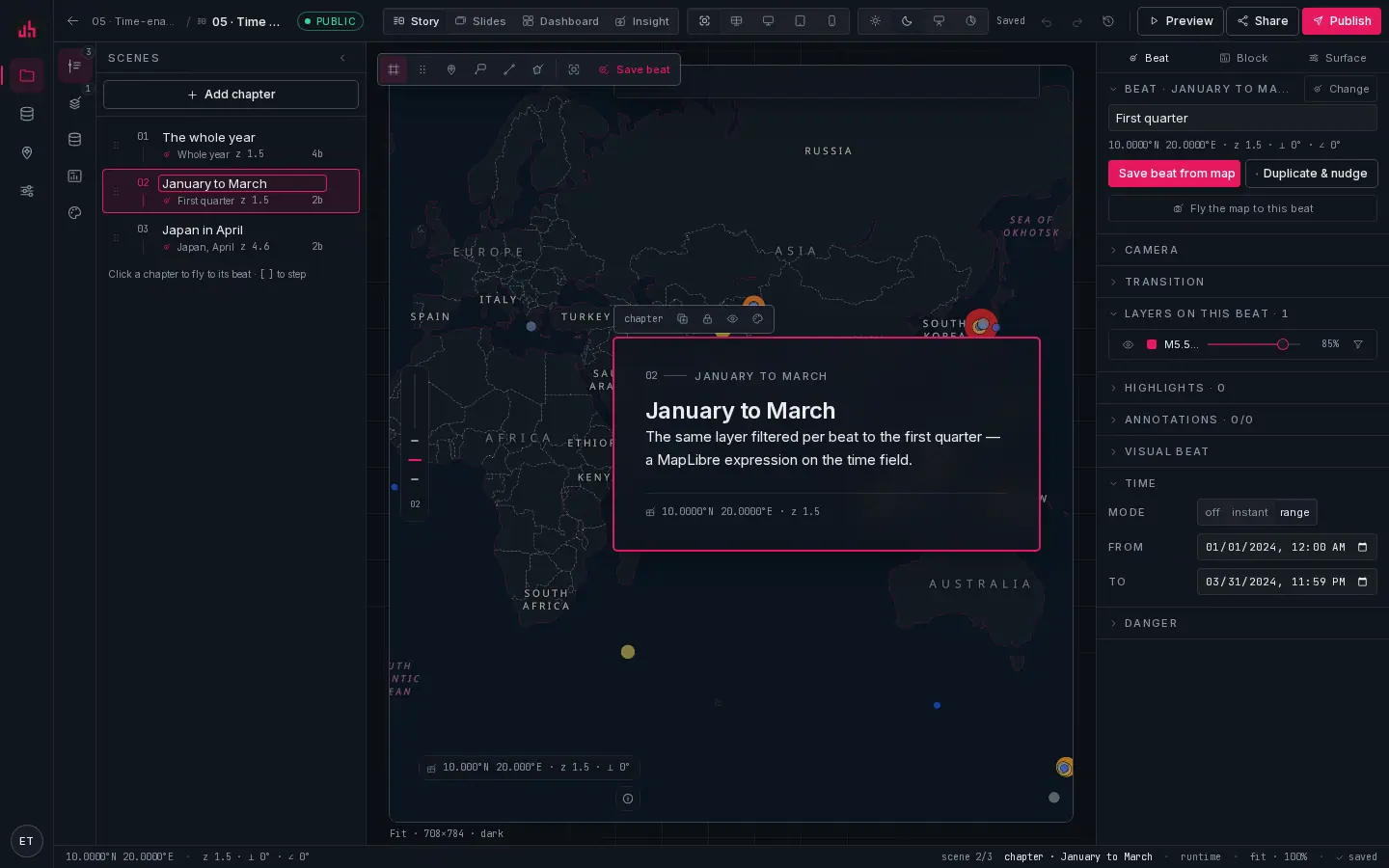
- Add chapter: creates a scene and saves the current map view as its beat.
- Scene list: each row shows the beat name, zoom and the block count. Drag to reorder.
- Active scene: clicking a scene flies the map to its beat.
[and]step through them. - Save beat from map: overwrite this scene's beat with what the map shows now. Shortcut
B. - Duplicate & nudge: copies the beat and offsets the camera slightly, so the next chapter starts from a small move rather than a jump.
- Fly the map to this beat: the other direction: put the map back where the beat says.
- Camera: centre, zoom, bearing and pitch as numbers, when you want exact values.
- Transition: kind, duration, curve and layer crossfade.
- Layers on this beat: visibility, opacity and a filter per layer.
- Highlights: an expression that picks features to ring, optionally pulsing.
- Annotations: which of the project's pins, lines, areas and callouts show on this beat.
- Time: off, an instant, or a range. Time-enabled layers follow it.
The everyday loop is: move the map → Save beat → Duplicate & nudge → move again → save. Typing numbers into the camera fields is for the cases where the map cannot be dragged precisely enough, not for normal work.
Camera
| Field | Range | Note |
|---|---|---|
center | [lng, lat] WGS84 | the status bar shows the cursor position in the same order |
zoom | 0 to 22 | fractional zooms are normal and useful |
bearing | −180…180 | interpolates on the shortest arc between beats |
pitch | 0 to 85 | anything above ~45° is needed for extrusions and terrain to read |
padding | px per side | keeps the subject clear of the narrative panel |
Transitions
| Kind | What it does | Use it for |
|---|---|---|
fly | an arc that zooms out and back in | long distances |
ease | a direct interpolation | neighbouring views, and any move under one zoom level |
jump | instant | comparisons where movement would be a distraction |
durationMs defaults to 1600 for stories and 1200 for slides; curve (1.42 by default) controls how high the flight arcs. crossfade fades layers whose visibility changes instead of popping them.
notekeep flights between 1.2 s and 2 s. Longer reads as a screensaver, shorter loses the reader. Under prefers-reduced-motion every transition becomes a jump and pulses stop, automatically.
Per-beat layer states
layerStates is where most of the authoring happens. Three keys carry the work:
visible: the layer is on for this beat. A layer the beat does not mention falls back to its owndefaultVisible.opacity: a flat choropleth at 25 % under a 3D extrusion is a per-beat opacity, not a second layer.filter: a MapLibre expression. Narrowing a layer per chapter is how a story argues: same data, tighter question.
{
  "<layerId>": {
    "visible": true,
    "opacity": 1,
    "filter": ["all", [">=", ["get", "time_iso"], "2024-04-01"], ["<=", ["get", "time_iso"], "2024-04-30T23:59:59Z"]]
  }
}
Highlights
A highlight is an expression plus a colour: the matching features get a ring, and with pulse: true the ring breathes. It is the right tool for "this one, here", a single airport or the one county above the threshold, because it does not disturb the layer's own styling.
{ "layerId": "<layerId>", "filter": ["==", ["get", "iata_code"], "IST"], "color": "#fde68a", "pulse": true }
Basemap and terrain per beat
A beat can override the project basemap (atlas paper, noir ink, terrain hillshade, satellite imagery, blank) and switch 3D terrain on with an exaggeration. Both change under the transition, so a chapter can move from a paper map to imagery as part of the flight.
Time
time.mode is off, instant or range. On range, time-enabled layers (those with a timeField) clip to the window, and any timeControl or dateRangeWidget on the surface starts there. playhead (0 to 1) is where the scrubber sits when the surface has one.
Scroll tweening
In a story, a chapter can interpolate towards the next one against scroll progress instead of snapping on entry:
import { interpolateCamera, interpolateLayerStates } from "@spatly/schema";

const cam = interpolateCamera(beatA.camera, beatB.camera, progress);                        // bearing takes the shortest arc
const states = interpolateLayerStates(beatA.layerStates, beatB.layerStates, progress, ids); // opacity and reveal lerp
Switch it on per chapter with scrollTween: { camera: true, layers: true }. Filters do not interpolate. They swap at the halfway point, because half a filter is not a state anyone means.
Visual beats
A beat can replace the map for the duration of a chapter: an image, a video, an inline SVG scene, a before/after swipe or a chart bound to a metric. The map returns on the next chapter with the camera it would have had, so the choreography is not interrupted.
Deep links
Any beat can be a URL. /s/<publicId>#ch=3 opens chapter three; ?beat=<beatId> opens any saved beat on any surface. Copy view link in the viewer writes the current beat into the address bar.
From an agent
set_map_view { projectId, name: "Antakya", bbox: [36.05, 36.1, 36.3, 36.3],
               layerStates: { "<layerId>": { visible: true, filter: [">=", ["get","mag"], 4] } } }
list_beats  { projectId }
bbox is accepted anywhere camera is, and is usually the better choice for an agent: it does not have to guess a zoom. See MCP server and REST API.
Verified on 2026-09-02 against the local development build (sample projects 01, 05, 06 and 08).
Something wrong or missing? Write to hello@spatly.io.