MCP server
Connect Claude Desktop, Cursor, Claude Code or any MCP client to your workspace: transports, scopes, the twenty-one tools, resources and prompts, the agent budget, and worked sessions.
What it is
Spatly ships an official Model Context Protocol server. An agent connected to it sees your workspace the way you do, with projects, layers, features, beats and metrics, and it can write chapters, insight cards and share links through the same REST API and the same permission model. It is on every plan, including Free.
Spatly is also an MCP consumer: a tool on your own server (inventory, CRM, IoT, tickets) can feed a Spatly dataset. That direction is documented under Data & live sources.
Connect
| Transport | Endpoint | Auth |
|---|---|---|
| Streamable HTTP (remote) | https://spatly.io/mcp | Authorization: Bearer spk_… |
| stdio bridge (local) | npx -y @spatly/mcp | SPATLY_TOKEN=spk_… (plus SPATLY_API_URL when self-hosted) |
The bridge replays every tool over /api/v1, so both transports expose exactly the same tools. Create the token under Settings → API tokens; that page also prints the snippets below with your own origin filled in.
{ "mcpServers": { "spatly": { "command": "npx", "args": ["-y", "@spatly/mcp"], "env": { "SPATLY_TOKEN": "spk_…" } } } }
{ "mcpServers": { "spatly": { "url": "https://spatly.io/mcp", "headers": { "Authorization": "Bearer spk_…" } } } }
claude mcp add --transport http spatly https://spatly.io/mcp --header "Authorization: Bearer spk_…"
The Settings → API tokens page prints both, ready to paste:
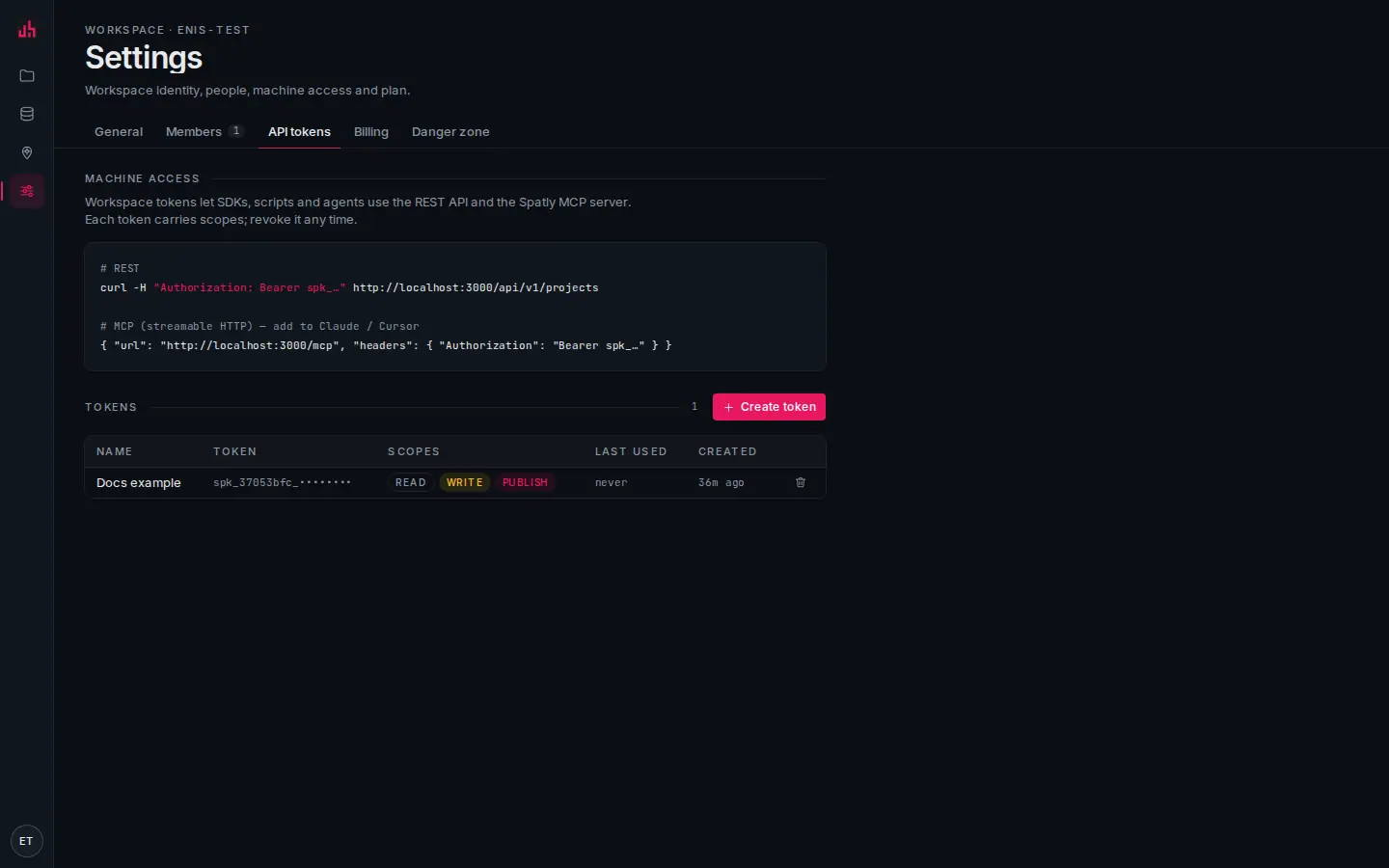
- API tokens: the tab where machine access lives.
- Snippets: the
curlline and the MCP client entry, with this deployment's origin already filled in. - Create token: pick
readalone for an agent that should only read. - Tokens: prefix, scopes and last use, so you can tell which agent is actually calling.
A handshake looks like this:
{ "name": "spatly", "version": "1.0.0" }
Scopes and the budget
- Scopes:
read,write,publish, carried by the token. A tool whose scope the token lacks returns a friendlyforbiddennaming the scope, not a protocol error. - Agent budget:
maxCallsPerMin(60) →rate_limitedwithretryAfterSec;maxRowsPerCall(500) clamps every feature query and list;requireBboxcan force a bounding box. A live connection adds its ownqueryPolicyand can be hidden from agents entirely (agentAccessible: false). - Kill switch: MCP can be turned off for a whole workspace (
mcpEnabled).
Rows are never dumped wholesale: every list carries nextCursor, and feature results carry total and the budget that was applied. See Plans, limits & alerts.
Tools
Twenty-one, in five groups.
| Tool | Scope | What it does |
|---|---|---|
list_projects | read | projects { items, nextCursor }, templates flagged |
get_project | read | one project with layers, beats, surfaces (share urls), datasets, metrics |
create_project | write | a new empty project |
list_layers | read | the layers of a project |
describe_layer | read | fields with statistics, the style, the classification, dataset urls |
list_datasets | read | workspace datasets |
describe_dataset | read | schema, bbox, time field, connection health |
query_features | read | bbox / where / q / select / orderBy / limit → FeatureCollection, budget-capped |
search_features | read | free text over the label fields |
spatial_filter | read | polygon · near { lng, lat, radiusM } · bbox, plus where |
geocode · reverse_geocode | read | cached OpenStreetMap lookups (attribution required) |
list_beats | read | the project's saved map states |
set_map_view | write | create a beat from a camera or a bbox, with layer states and highlights |
list_surfaces | read | the story / slides / dashboard / insight surfaces of a project |
create_story_chapter | write | a chapter with its beat, inserted at index |
list_kpis | read | metrics with their current values |
get_kpi_value | read | one value, scoped by bbox / aoi / where / selection / from-to |
query_timeseries | read | a bucketed series |
create_insight_container | write | an embeddable insight, collapsed card plus expanded workspace |
publish_share_link | publish | publish a surface → { publicId, url, embedUrl } |
Every result comes back as JSON text and as structuredContent. Errors arrive as isError with code: message (not_found, forbidden, rate_limited, bad_request…), never as protocol failures, so an agent can read the message and recover.
notewhere on the feature tools is the object grammar, { "mag": { "gte": 7 } }. MapLibre expressions belong in layerStates[].filter and highlight.filter. See REST API.
Resources and prompts
Two resource templates (they appear under resources/templates/list, not resources/list, because both take an id):
| URI template | Contents |
|---|---|
spatly://projects/{id} | the same payload as get_project |
spatly://datasets/{id}/schema | fields, statistics, bbox, time field |
One prompt:
| Prompt | Arguments | What it does |
|---|---|---|
story_from_dataset | projectId, datasetId, chapters?, audience? | walks an agent from a dataset to a published story: describe → read the data → outline → create chapters → publish |
Worked sessions
"Create a six-chapter story from this dataset"
list_datasets→ pick the dataset, orPOST /api/v1/datasets/from-urlto add one.get_project→ notelayers[0].idand the story surface id (create one in Studio if the project has none).describe_layer→ field names and statistics.list_kpis→ the headline numbers.query_features { geometry: false, orderBy, limit: 20 }→ the facts you will write about.- Per chapter:
create_story_chapter { surfaceId, title, text, bbox | camera, layerStates: { "<layerId>": { "filter": [">=", ["get","mag"], 5] } }, highlight }. publish_share_link { surfaceId, visibility: "unlisted" }→ hand back theurl.
Or invoke story_from_dataset and let the prompt drive.
"Wire a live KPI"
- Connect the source (Data → From URL / REST API / MCP source / catalog). The scheduler refreshes it.
- Create a metric in Studio, for example
countwithfilter [">=", ["get","mag"], 5]andspatialScope: "viewport". get_kpi_value { metricId, bbox }returns the number; a dashboard polls/api/live/metrics/:idwith an ETag;query_timeseriesgives the sparkline.- Optionally add an alert so a threshold crossing e-mails someone.
"Embed an insight"
list_kpis { projectId }→ pick up to four metric ids.geocodethe place →set_map_view { bbox }, or passbboxstraight to the next call.create_insight_container { projectId, name, text, metricIds, bbox, cta: "Open insights" }.publish_share_link { surfaceId }→ drop theembedUrlon a page. See Embedding.
Guardrails worth setting before you hand an agent a token
- Give read-only agents a
read-only token.writeandpublishare separate for a reason. - Turn on
requireBboxif the workspace holds large datasets. It stops "select everything" by construction. - Set
agentAccessible: falseon any connection an agent has no business reading. - Watch usage per day, per tool and per token under Settings → API tokens.
Self-hosting notes
SPATLY_API_URLpoints the stdio bridge at your own deployment.pnpm --filter @spatly/web mcp:smokeexercises the HTTP transport;scripts/mcp-stdio-smoke.tsdoes the same for the bridge.
Verified on 2026-09-02 against the local development build: initialize, tools/list (21 tools), tools/call list_projects, resources/templates/list, resources/read spatly://projects/{id} and prompts/list were each called over streamable HTTP with a real workspace token.
Something wrong or missing? Write to hello@spatly.io.