Publishing & sharing
Visibility states, short and pretty links, passwords, domain restriction, snapshots versus live layers, OG previews, deep links, the badge and viewer analytics.
Publish is a snapshot
Nothing you edit reaches a reader until you press Publish. Publishing writes a snapshot: the block tree, the beats it references, the layer styles, the theme, and, per layer, either a frozen copy of the data or a pointer to its live source.
The snapshot is what /s/<publicId> serves, with an ETag. It changes only when you publish again. Live layers and live metrics keep polling on their own intervals inside that snapshot.
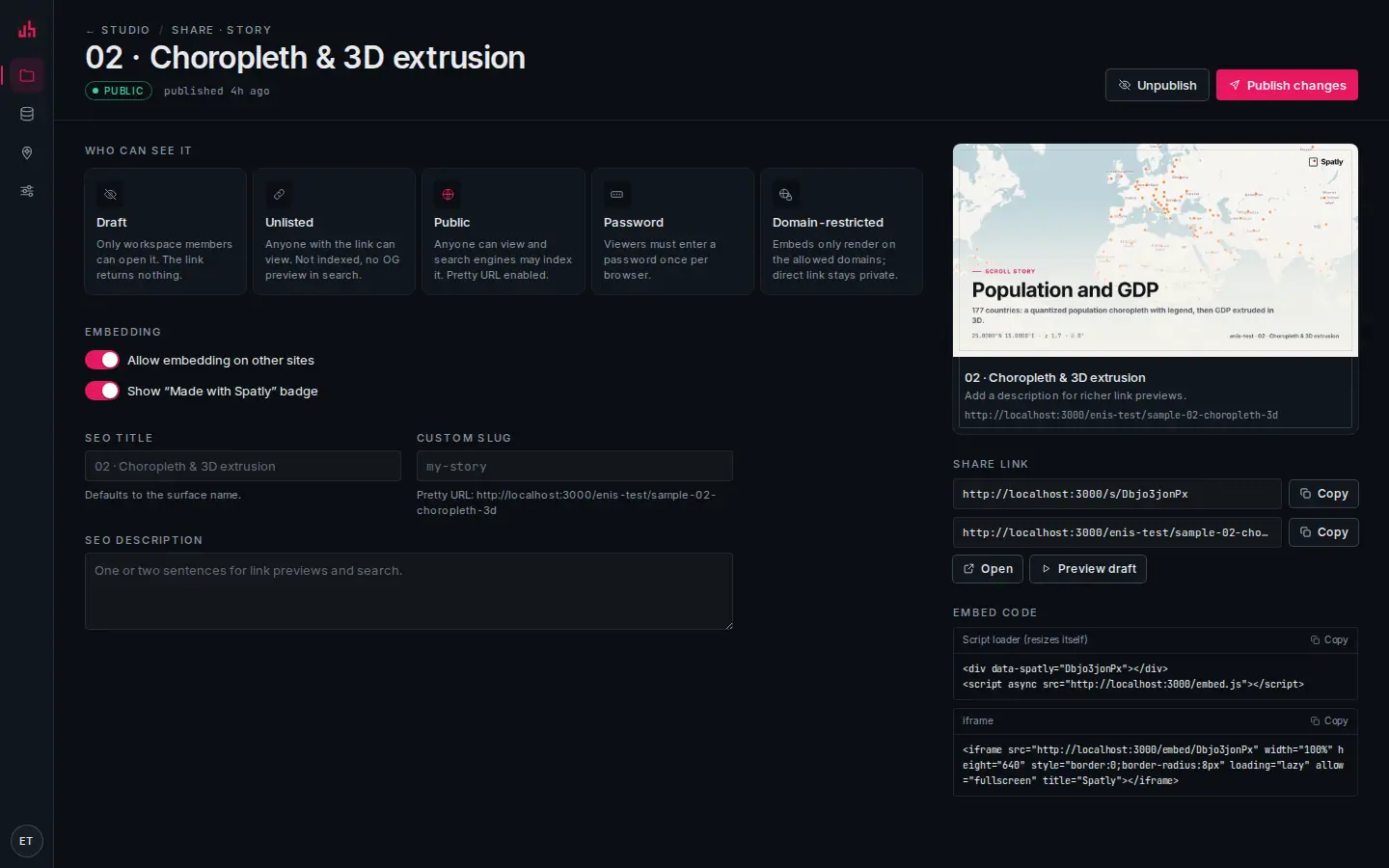
- Who can see it: the five states, each with the rule stated in one line.
- Draft: the default. The public link returns nothing.
- Password: one prompt per browser, then a short-lived cookie scoped to this surface.
- Domain-restricted: the embed renders only on hosts you list; the direct link stays private.
- Embedding: allow other sites to frame this surface at all.
- Made with Spatly: the plate bottom-left; switchable off on paid plans.
- SEO title and description: the link preview and the OG image text.
- Custom slug: the pretty URL under your workspace.
- Share link: the short link and the pretty link, each with copy.
- Embed code: the script loader and a plain iframe, both ready to paste.
- Publish changes: writes a new snapshot and a new version entry.
Visibility states
| State | Who can open it | Notes |
|---|---|---|
draft | workspace members, in Studio | the default; the public link returns nothing |
unlisted | anyone with the link | not in sitemaps, noindex, no search preview |
public | anyone | indexable, pretty URL enabled |
password | anyone with the link and the password | one prompt per browser; the cookie is scoped to that surface |
domain | only when embedded on the hosts you list | the direct link answers 403, use it for internal portals |
Changes take effect immediately. Setting a surface back to draft removes it from links and embeds at once, though a cached copy can live in an intermediary for up to a day.
Links
https://spatly.io/s/<publicId>                     short link
https://spatly.io/<workspace>/<project>            pretty link (the project's default surface)
https://spatly.io/<workspace>/<project>/<surface>  a specific surface
https://spatly.io/embed/<publicId>                 the embed runtime (iframe target)
The short link always works, including after a slug change, because the pretty link redirects to it.
Deep links
| Form | Effect |
|---|---|
#ch=3 | open a story at chapter three |
?beat=<beatId> | fly any surface to a saved beat |
?variant=night | render in a theme variant (chrome only; the map palette is baked into the snapshot) |
?f=<json> | restore dashboard filters, what Copy view link writes |
?expanded=1 | open an Insight Container already expanded |
Copy view link in the viewer writes the current beat, and on a dashboard the current filters, into the address bar. A deep-linked load scrolls instantly rather than smoothly, so the reader lands on the right scene before tiles and fonts settle.
Snapshot or live, per layer
Each layer publishes as frozen or live:
- frozen: the features as they were when you published. A story from March still says what it said in March.
- live: the viewer fetches from the source on its refresh interval, inside the published snapshot.
Stories and slides default to frozen; dashboards and insights default to live. Set it per layer in the layer inspector (Data: frozen | live).
Versions
Every publish saves a version, and ⌘S saves one by hand with a label. Surface → History lists them and restores any of them. Restoring is itself an edit, so you still have to publish it.
SEO and the link preview
For public and unlisted surfaces Spatly renders an Open Graph image at /api/og/<publicId>: a static map frame of the cover beat with the title in an atlas plate. Override the title, the description and the frame under SEO on the share page. public surfaces are listed in the sitemap; unlisted ones carry noindex.
The badge
Free-plan surfaces and embeds show a small Made with Spatly plate bottom-left. Pro, Team and Enterprise can switch it off per surface. It sits in the viewer's bottom-left stack, so it never lands on top of the scale bar or the attribution.
Attribution
Basemap and imagery attribution is legally required and is not removable. It lives in the viewer's bottom-right stack (stamp, scale bar, attribution, 8 px apart) and starts collapsed to a ⓘ that opens on hover or tap.
Viewer analytics
Published surfaces record four event kinds (view, scene, expand, select), batched from the viewer every five seconds. What is stored: the public id, a scene index or block id, a per-tab nonce and a coarse timestamp. No IP, no cookie, no identifier that survives the tab.
The share page reports views, chapters reached, expand rate and the most-selected features. Embeds report the same way, so a container on a partner's site tells you whether anyone opened it.
From an agent
publish_share_link { surfaceId, visibility: "unlisted" }
→ { publicId: "op22HXEpYC", url: "https://spatly.io/s/op22HXEpYC", embedUrl: "https://spatly.io/embed/op22HXEpYC" }
The same call over REST needs a publish-scoped token:
curl -X POST "$BASE/surfaces/$SURFACE_ID/publish" \
  -H "Authorization: Bearer $TOKEN" -H 'content-type: application/json' \
  -d '{"visibility":"unlisted","showSpatlyBadge":true,"allowEmbed":true}'
See REST API and MCP server.
Verified on 2026-09-02 against the local development build: publish → sign out → open /s/<publicId> → open /embed/<publicId>.
Something wrong or missing? Write to hello@spatly.io.